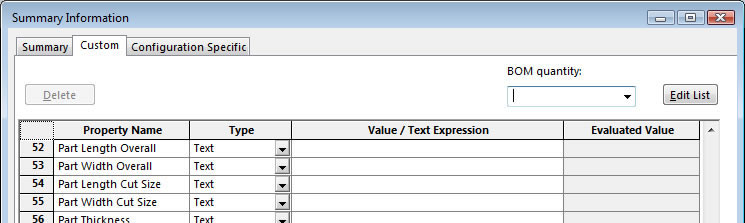
There are 2 sections in the Summary Information box. The first is the Custom tab and the other is the Configuration Specific tab.

This macro will pass the values from the Configuration Specific window to the Custom window then delete the Configuration Specific values. Now you can have a play around with this if you like by passing the values back.
Please click on the panels below to reveal or hide the macro code
' Preconditions: Make sure an assembly is open.
' You need to add references for:
' SolidWorks 20xx Type Library
' SolidWorks 20xx Constant Type Library
Sub DeleteCustPropMain()
On Error GoTo ErrH:
Dim swApp As SldWorks.SldWorks
Dim swModelDoc As SldWorks.ModelDoc2
Dim swSelMgr As SldWorks.SelectionMgr
Dim swSelComp As SldWorks.Component2
Dim FileToOpen As String
' Traverse feature tree to find second room part
' Comment out the line below if you want select a part manually
TraverseFeatureTree
' Connect to SW
Set swApp = Application.SldWorks
' Get active document
Set swModelDoc = swApp.ActiveDoc
' Get selection manager
Set swSelMgr = swModelDoc.SelectionManager
' Get selected component
' MAKE SURE A PART IS SELECTED
Set swSelComp = swSelMgr.GetSelectedObjectsComponent2(1)
' Check to see if Room part is selected
If swSelComp Is Nothing Then
' Comment out this line if manually selcting
MsgBox "Part Not Found"
' Comment out this line if TraverseFeatureTree is used
'MsgBox "Please select a part"
Exit Sub
Else
' Get ModelDoc if room part has been selected
Set swModelDoc = swSelComp.GetModelDoc
End If
' Get full path of part
FileToOpen = swModelDoc.GetPathName
' Open room part
swApp.ActivateDoc2 FileToOpen, True, 1
' Start deletion process
DeleteCustomProperties
' Close part
swApp.CloseDoc FileToOpen
' Clean up
Set swModelDoc = Nothing
Set swApp = Nothing
ErrH:
If Err.Number = 0 Or Err.Number = 20 Then
Resume Next
Else
MsgBox Err.Number & " " & Err.Description
End If
End Sub
Sub TraverseFeatureTree()
Dim swApp As SldWorks.SldWorks
Dim swModelDoc As SldWorks.ModelDoc2
Dim swFeature As SldWorks.Feature
Dim ModelDocType As Long
Dim FeatureName As String
' Connect to SW
Set swApp = Application.SldWorks
' Get active document
Set swModelDoc = swApp.ActiveDoc
' Clear any selection
swModelDoc.ClearSelection
' Get document type
ModelDocType = swModelDoc.GetType
' Get first feature in feature manager
Set swFeature = swModelDoc.FirstFeature
' Start traversal
While Not swFeature Is Nothing
FeatureName = swFeature.Name
Debug.Print FeatureName
' Do what you want here. I just searched for a part with the text 'Room Part 2' in it
' Change "Room Part 2" to the BOM of your choice
' Or take out the Instr() function if you want to search for a specific part
If InStr(1, FeatureName, "Room Part 2") <> 0 Then
'Stop
' Select the feature
swFeature.Select True
' Exit early
Exit Sub
End If
' Get next feature
Set swFeature = swFeature.GetNextFeature
Wend
End Sub
Sub DeleteCustomProperties()
' Make sure a part is open
Dim swApp As SldWorks.SldWorks
Dim swModelDoc As SldWorks.ModelDoc2
Dim swConfigMgr As SldWorks.ConfigurationManager
Dim swConfig As SldWorks.Configuration
Dim swCustPropMgr As SldWorks.CustomPropertyManager
Dim NumberOfCustProps As Long
Dim j As Long
Dim vPropNames As Variant
Dim RetVal As Boolean
Dim ValOut As String
Dim ValOut2 As String
Dim CustPropVal As String
' Connect to SW
Set swApp = Application.SldWorks
' Get active document
Set swModelDoc = swApp.ActiveDoc
' Get config manager
Set swConfigMgr = swModelDoc.ConfigurationManager
'Get active configuration
Set swConfig = swConfigMgr.ActiveConfiguration
'Get custom property manager
Set swCustPropMgr = swConfig.CustomPropertyManager
' Get the number of custom properties for this configuration
NumberOfCustProps = swCustPropMgr.Count
' Exit early if no custom properties exist
If NumberOfCustProps = 0 Then Exit Sub
' Get the names of the custom properties
vPropNames = swCustPropMgr.GetNames
'swCustPropMgr.Get3 vPropNames
' Start to pass over the values from the Configuration Specific window to the Custom Info window
' Then delete the values in the Configuration Specific window
For j = 0 To NumberOfCustProps - 1
' This line gets every property from the Configuration Specific window
RetVal = swCustPropMgr.Get3(vPropNames(j), True, ValOut, ValOut2)
'This line adds it to the Custom Info window
RetVal = swModelDoc.AddCustomInfo((vPropNames(j)), "Text", ValOut)
'This line deletes the values from the Configuration Specific window
swCustPropMgr.Delete (vPropNames(j))
Next j
End Sub